
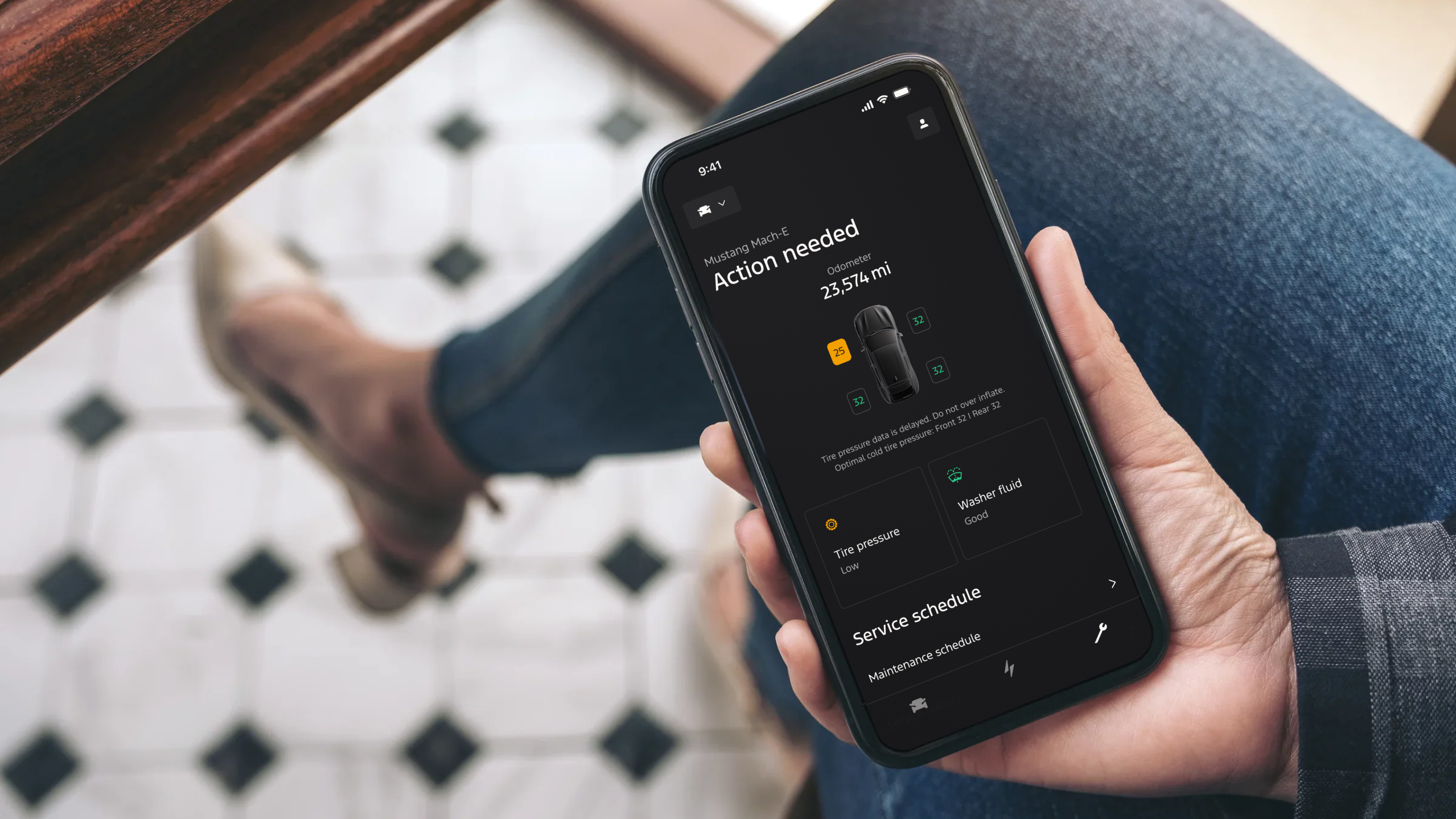
Ford • Mobile App
Moving vehicle owners to put trust in their mobile app and book service at in-network providers
mobile design
design systems
design research
user testing
data-driven design
Project Objective
Redesign and create a set of vehicle health and care related features in the Ford and Lincoln mobile apps.
role
Lead Product Designer
timeline
15 months
core team
7 Engineers
3 Product Managers
2 Product Designers
Key Skills
UX/UI design
Prototyping
Data-driven design
tools & methods
Figma
UserZoom
User interviews
Usability testing

+30%
engagement
+30%
engagement
+30%
engagement
Central Question
How might we improve the user experience for managing vehicle health, care, and service from the mobile app?
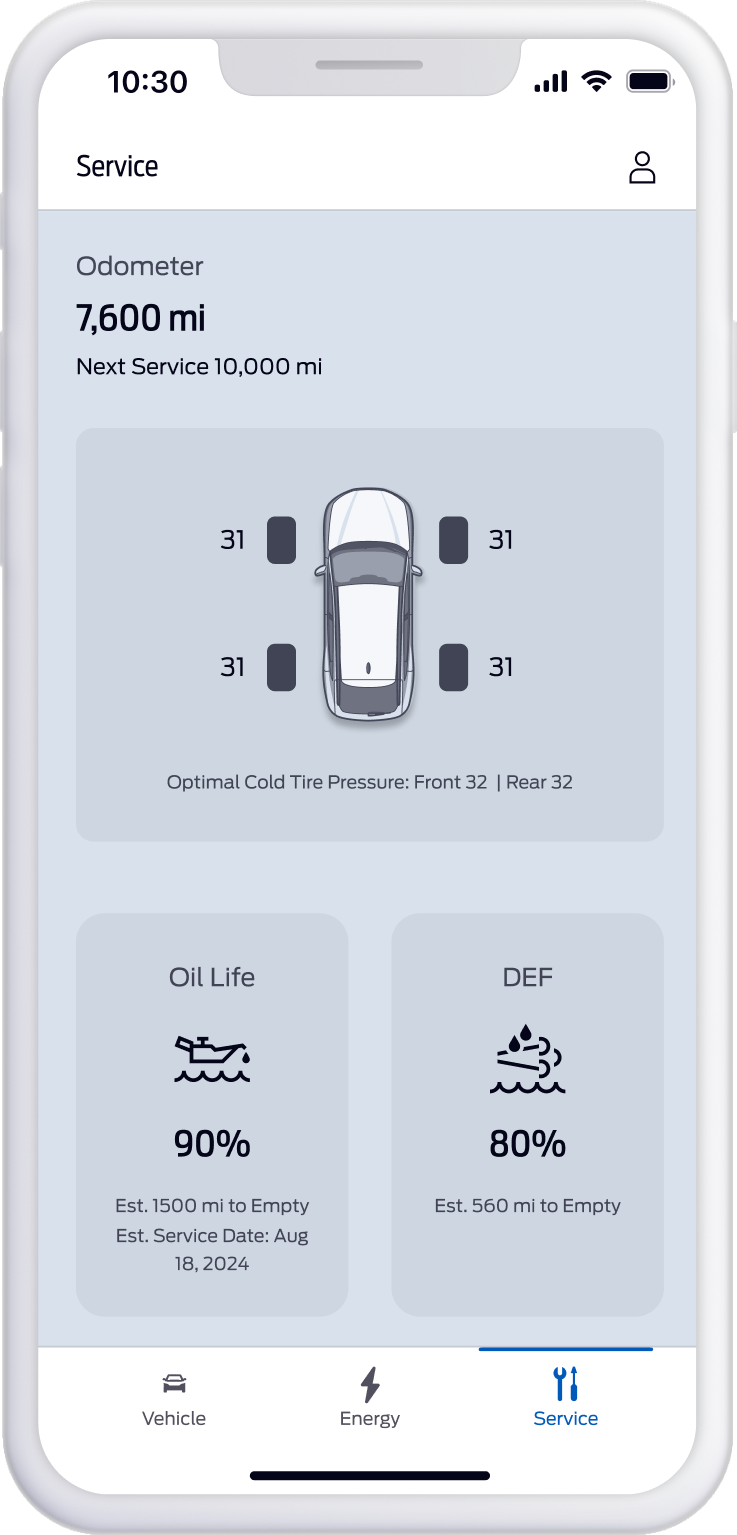
Original Design
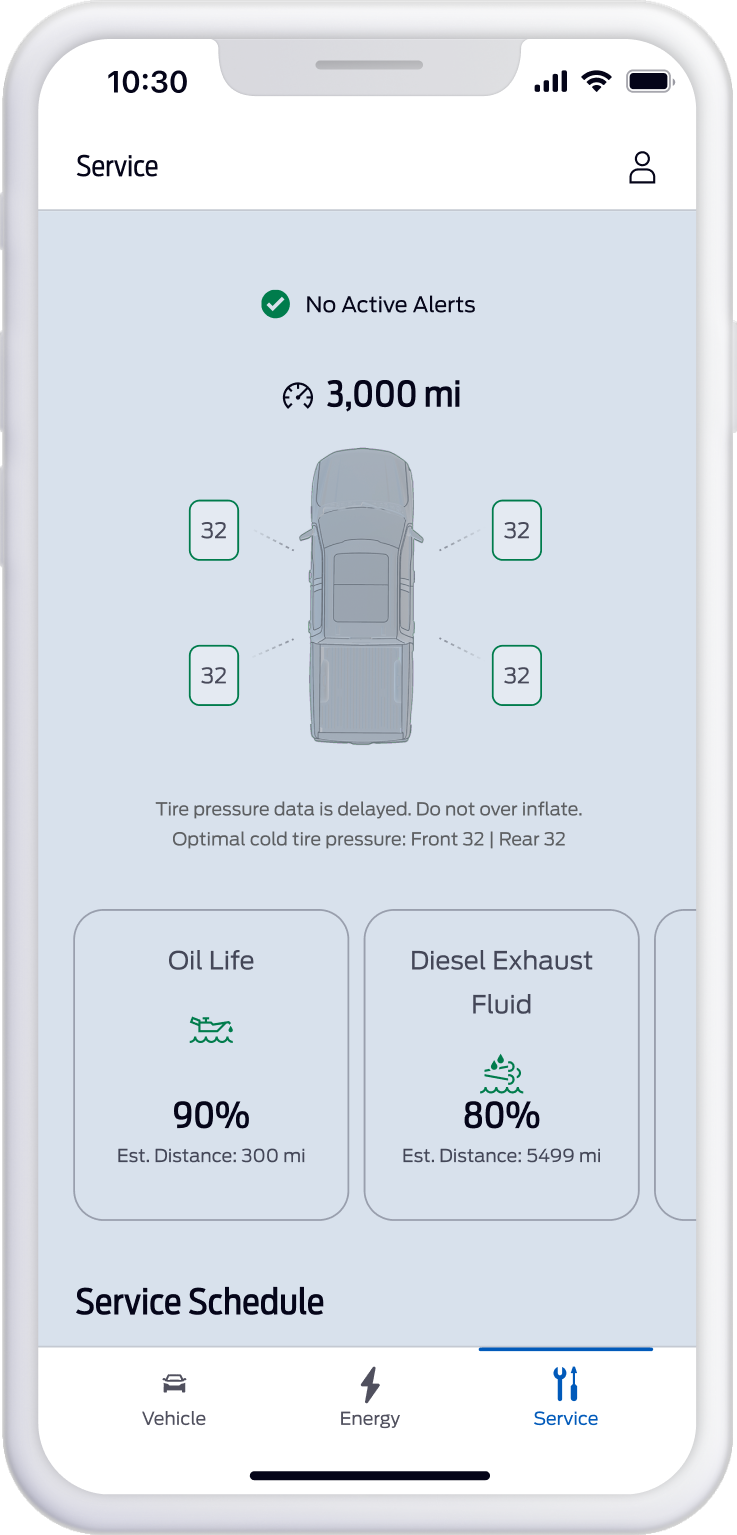
MVP Redesign
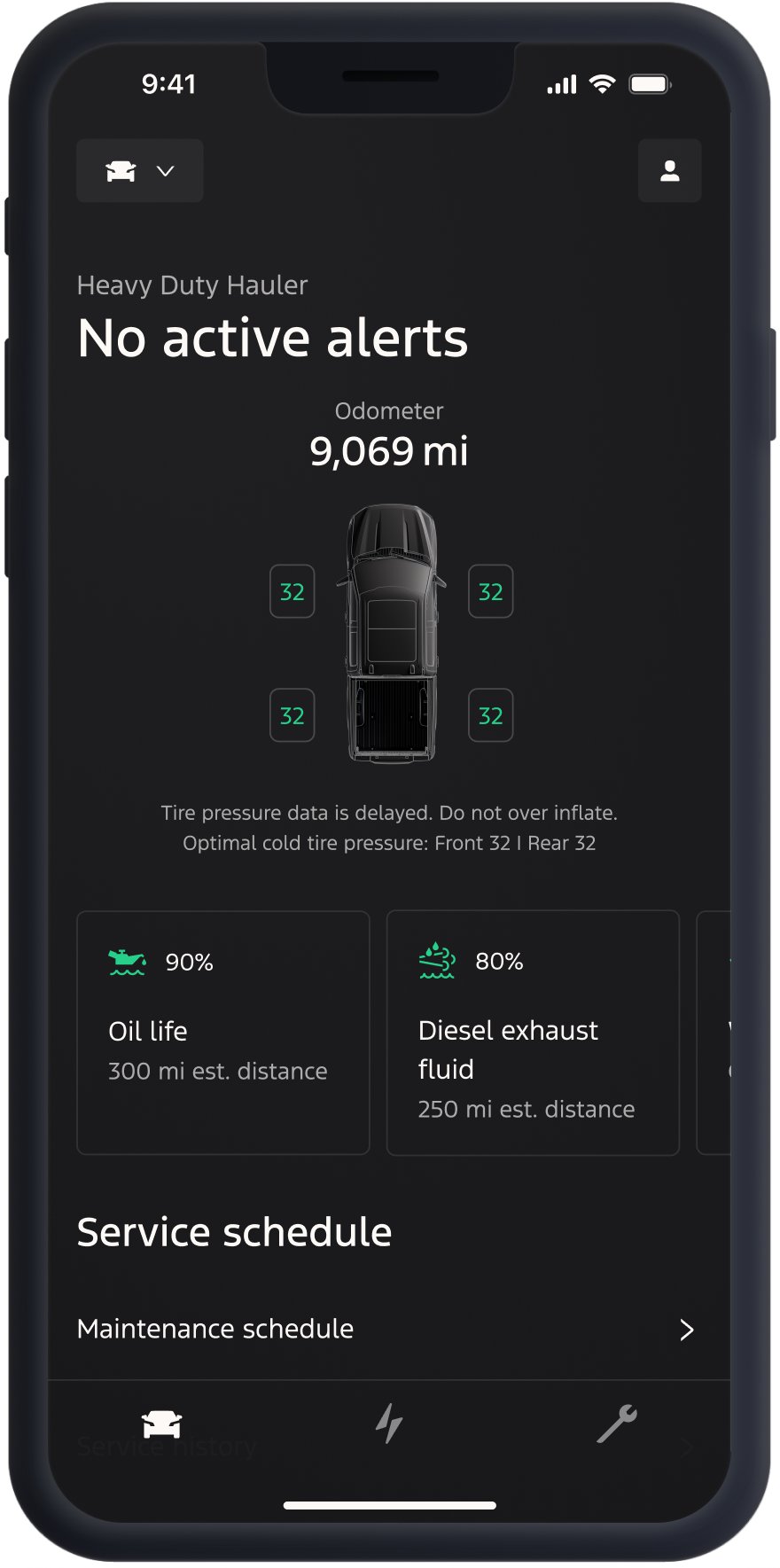
Final Redesign
The Problem
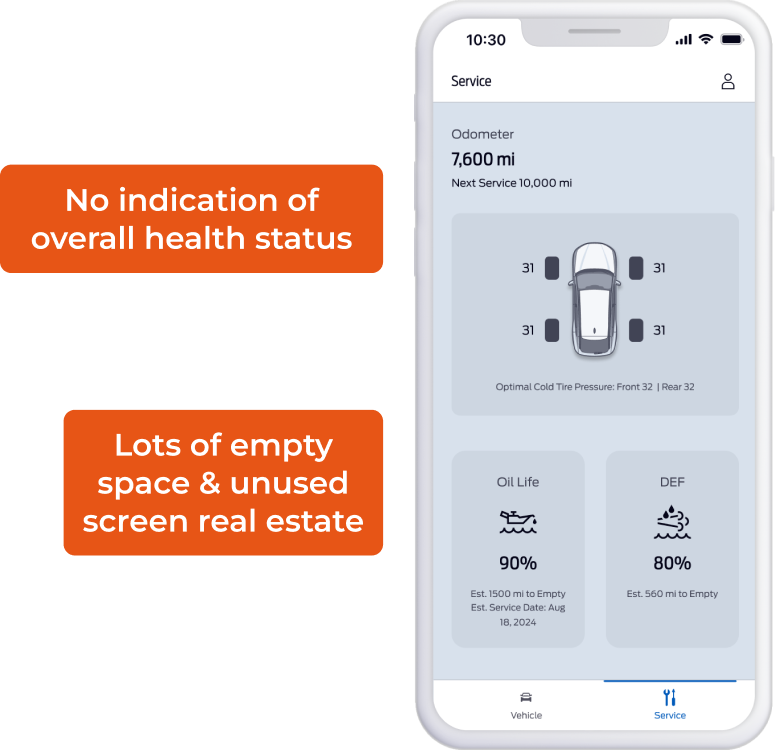
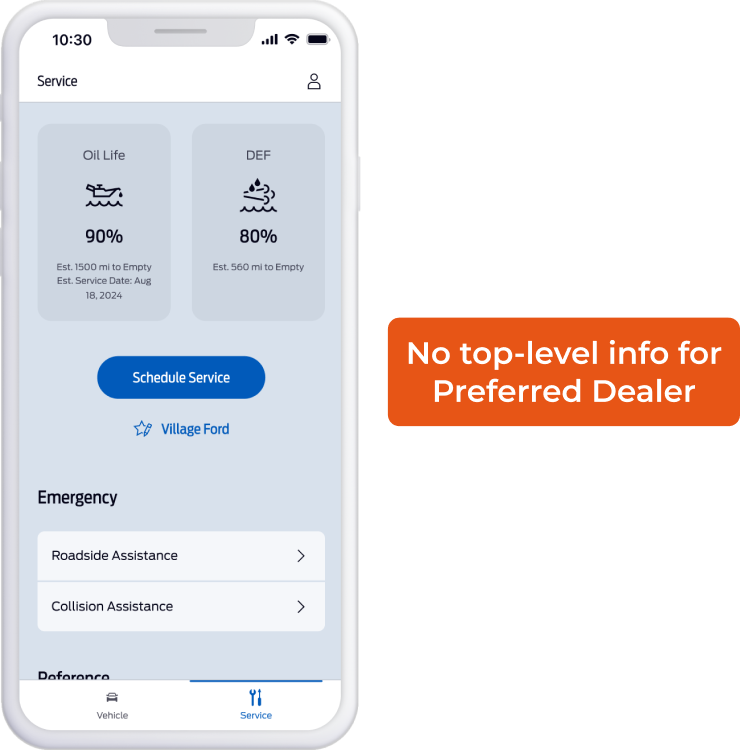
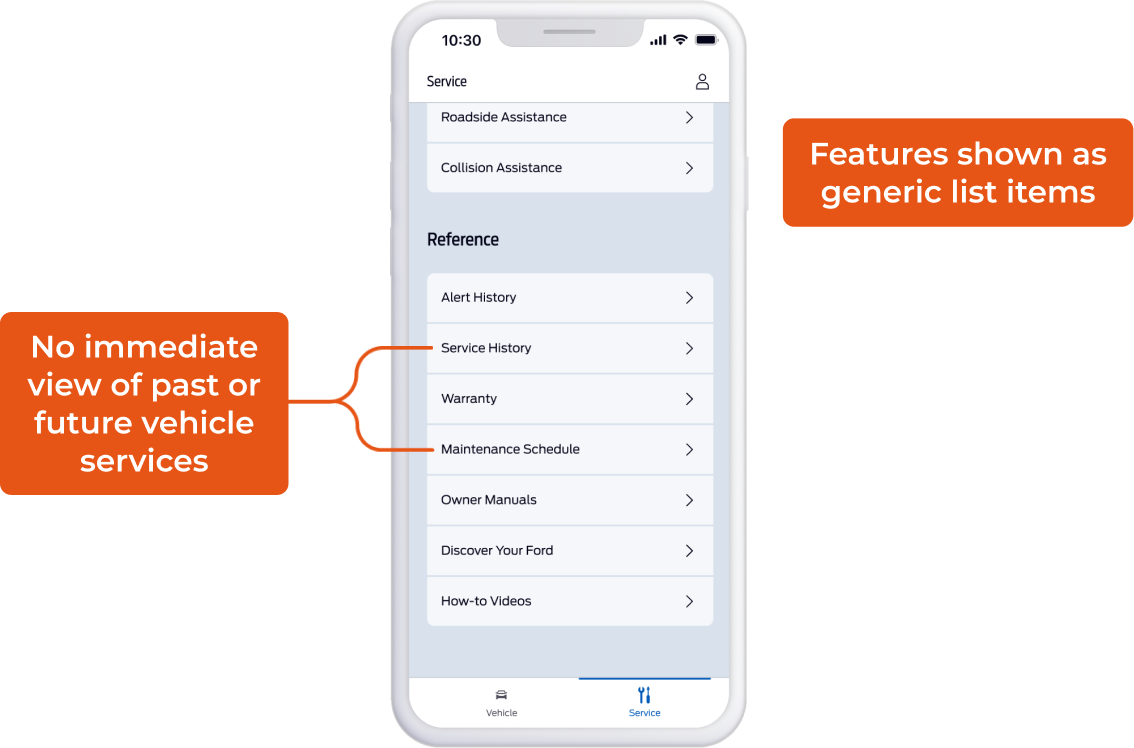
The existing set of vehicle health and service-related features were not engaging, useful, or helpful to users.
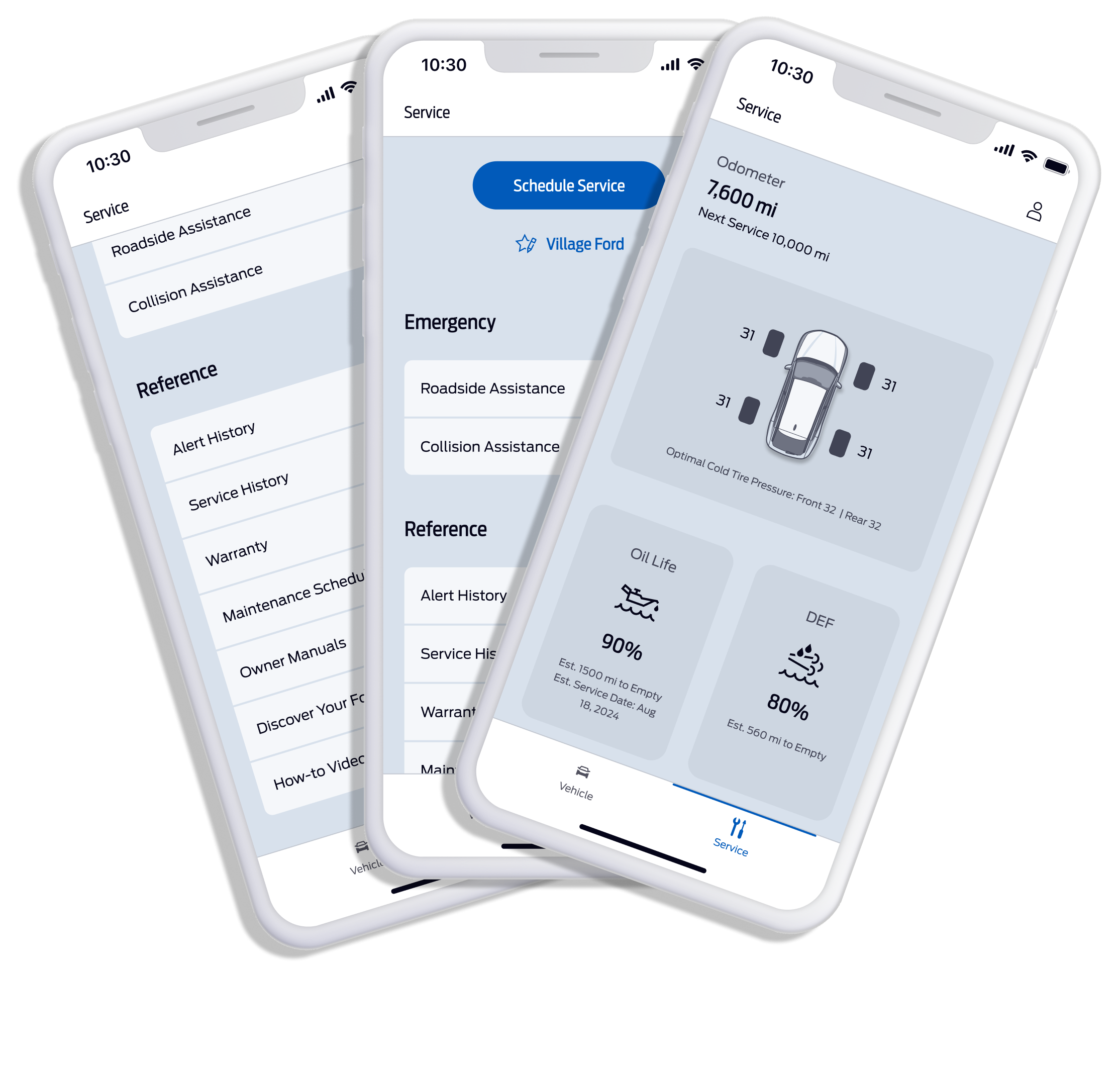
- No clear intent for “Service” tab
- Disparate features instead of a single ecosystem
- Important info shown in generic ways
- Key features hidden 4 clicks deep
- Users complain about missing or hard-to-find features

Pain Point #1
Knowledge

“I don’t feel like vehicle service is transparent and trustworthy.”
Pain Point #2
Impact
“I can’t track the impact of my actions on my vehicle’s health.”
Pain Point #3
Trust
“I don’t know how I should be taking care of my vehicle.”

of monthly users
didn’t visit the “Service” tab
70
%
2.4

Avg app rating*
88
%
of reviews* with negative sentiment
*For app reviews that contained service-related keywords
User reviews mentioned missing or hard-to-find features, and an outdated aesthetic.
By identifying specific targets and success metrics ahead of our design work, we were able to create a framework for measurable impact.

Engagement
Do they use it?

Task Success
Can they get stuff done?

Satisfaction
Do they love it?
Desired Outcomes

Increase engagement with the Service tab and its features

Increase number of users who set a Preferred Dealer

Encourage users to perform recommended routine maintenance checkups and service for their vehicle

Boost user’s confidence in knowing the health status of their vehicle just from the mobile app

Build greater trust between Ford Inc., Ford dealers, and Ford customers
Using a sequential series of UI updates and new feature releases, we were able to see the direct impact of our design decisions.

Vehicle Health Redesign 1.0
Release 1.0
A glanceable summary of the health and status of the vehicle.
Release 1.0 – Results
Engagement
+30pp
60.6
%
of active users
engaged with the “Service” tab
70
%
of active users
made multiple visits to the “Service” tab

Task Success (conversion)
45.9
%
of users who tapped alert
completed repair at an in-network dealer
130
k
“Oil change” alerts tapped
28.1
%
of users who tapped alert
scheduled service within 30 days
+200
%
service appts booked after viewing recall
Satisfaction
+0.5
2.9

Average app review rating (out of 5)
2025 EOY target = 2.9
+130%
28
%
of app store reviews
contained positive sentiment
2025 EOY target = 30%
With validation that our initial design interventions were having the desired effect, we solidified stakeholder buy-in for the redesign initiative and next phases.

Vehicle Health Redesign – 2.0
Release 2.0
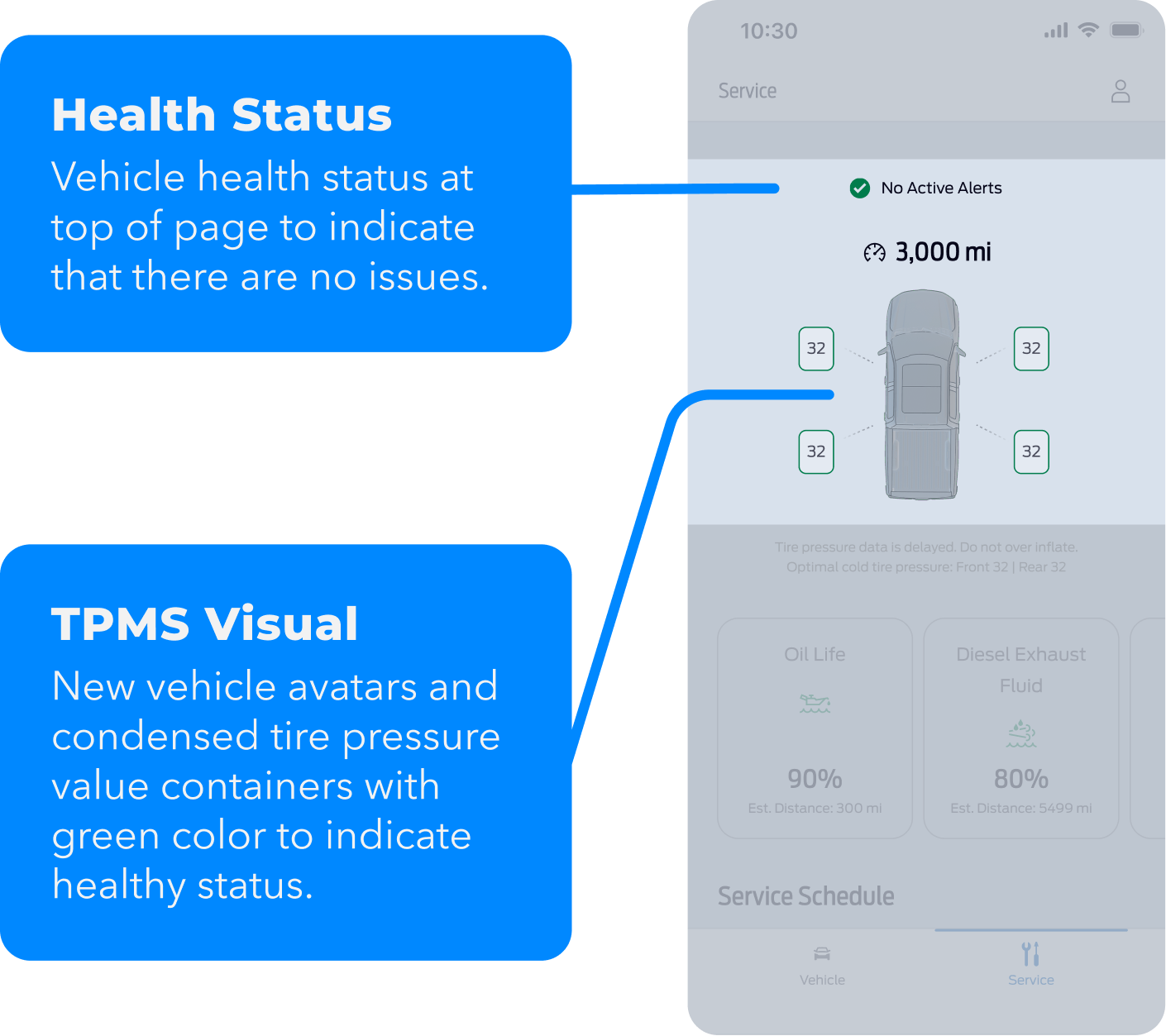
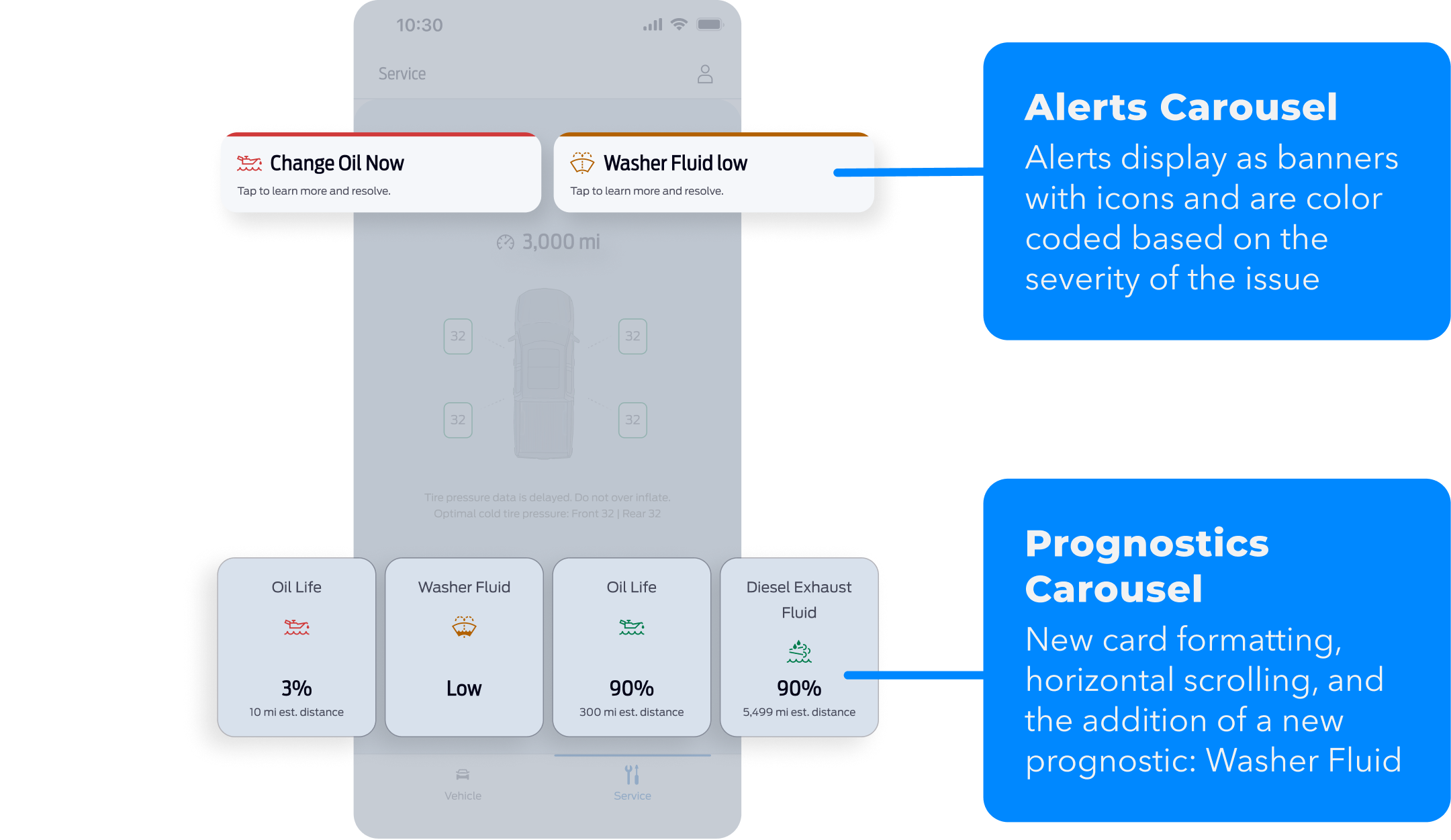
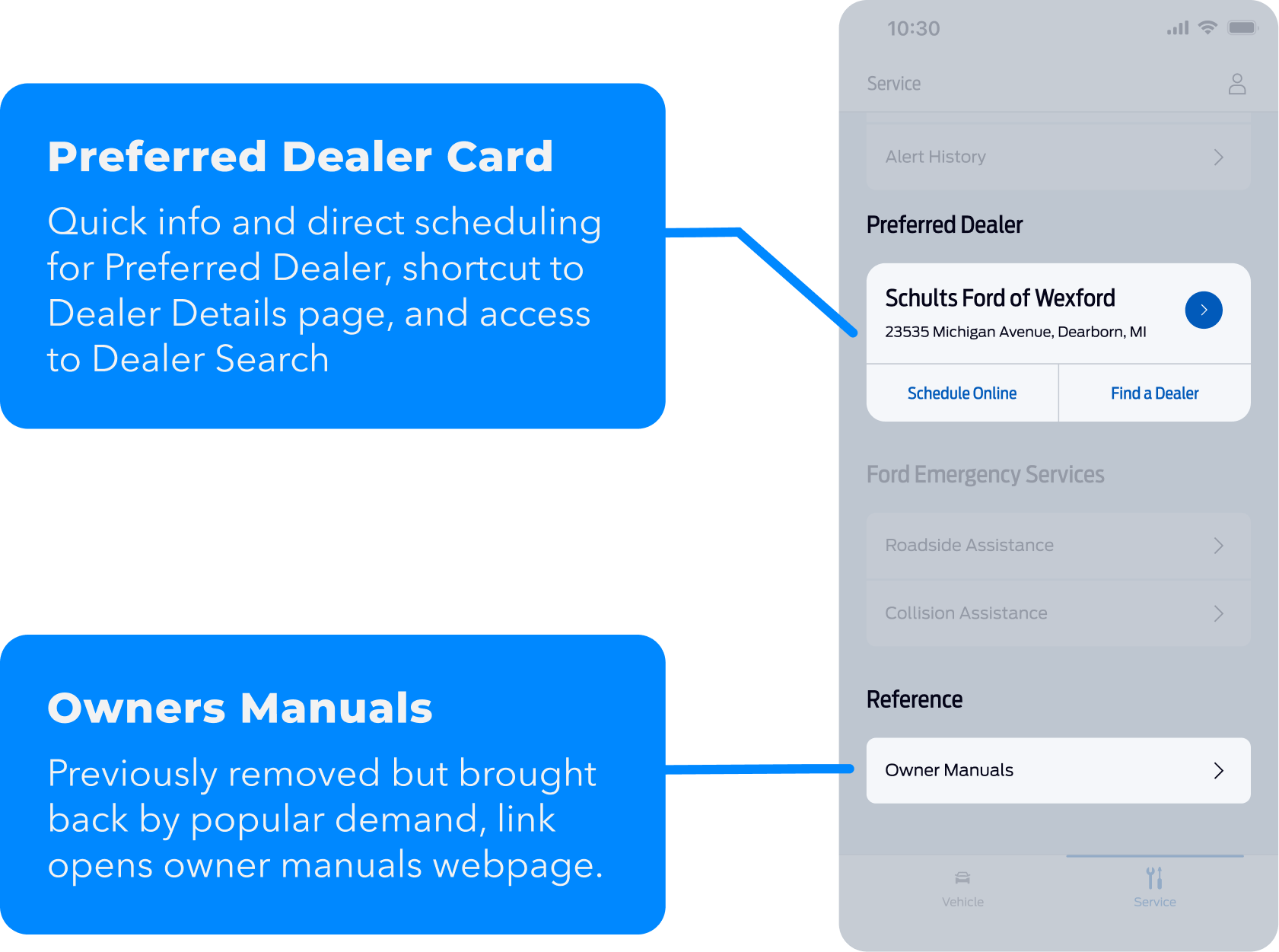
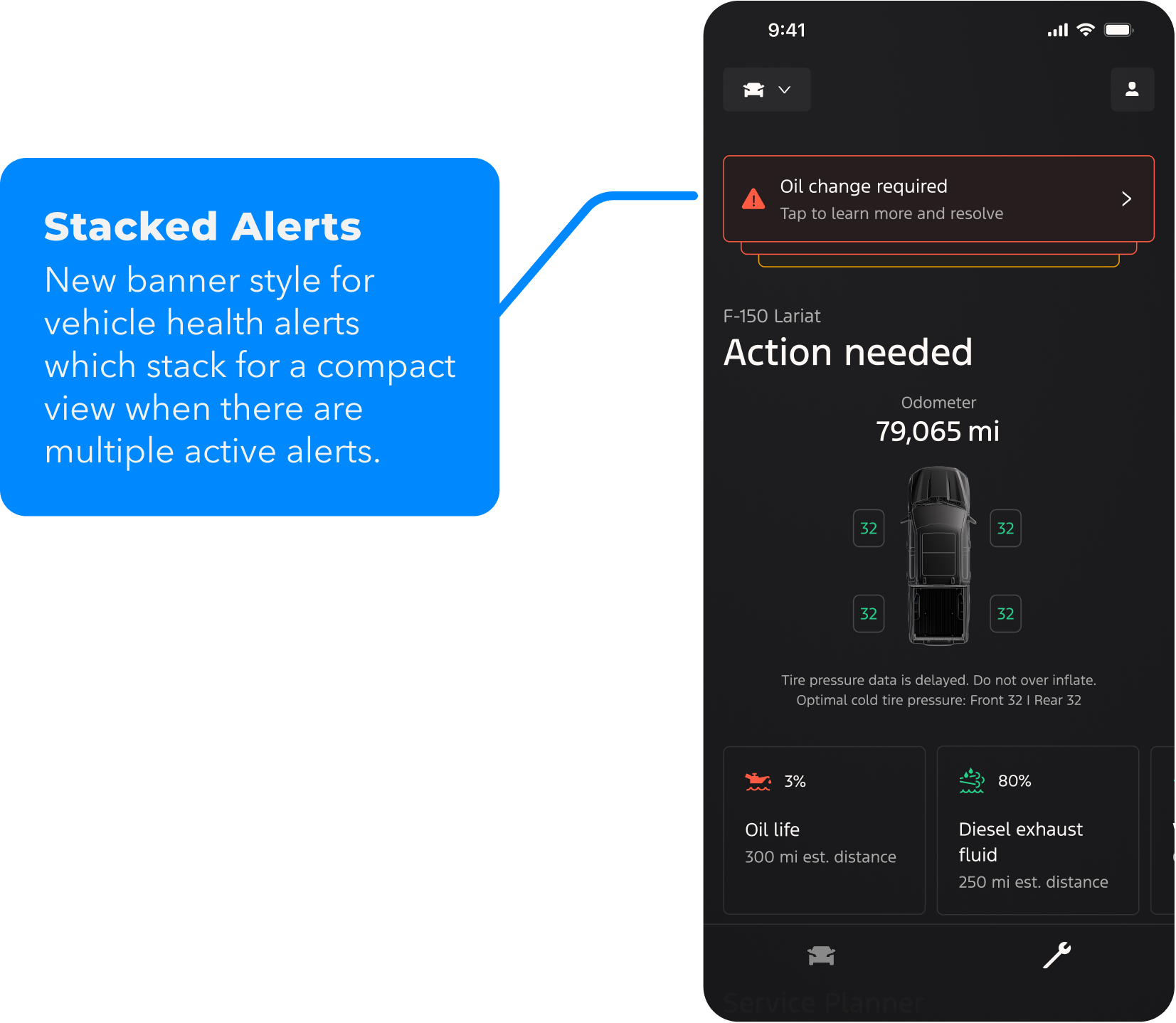
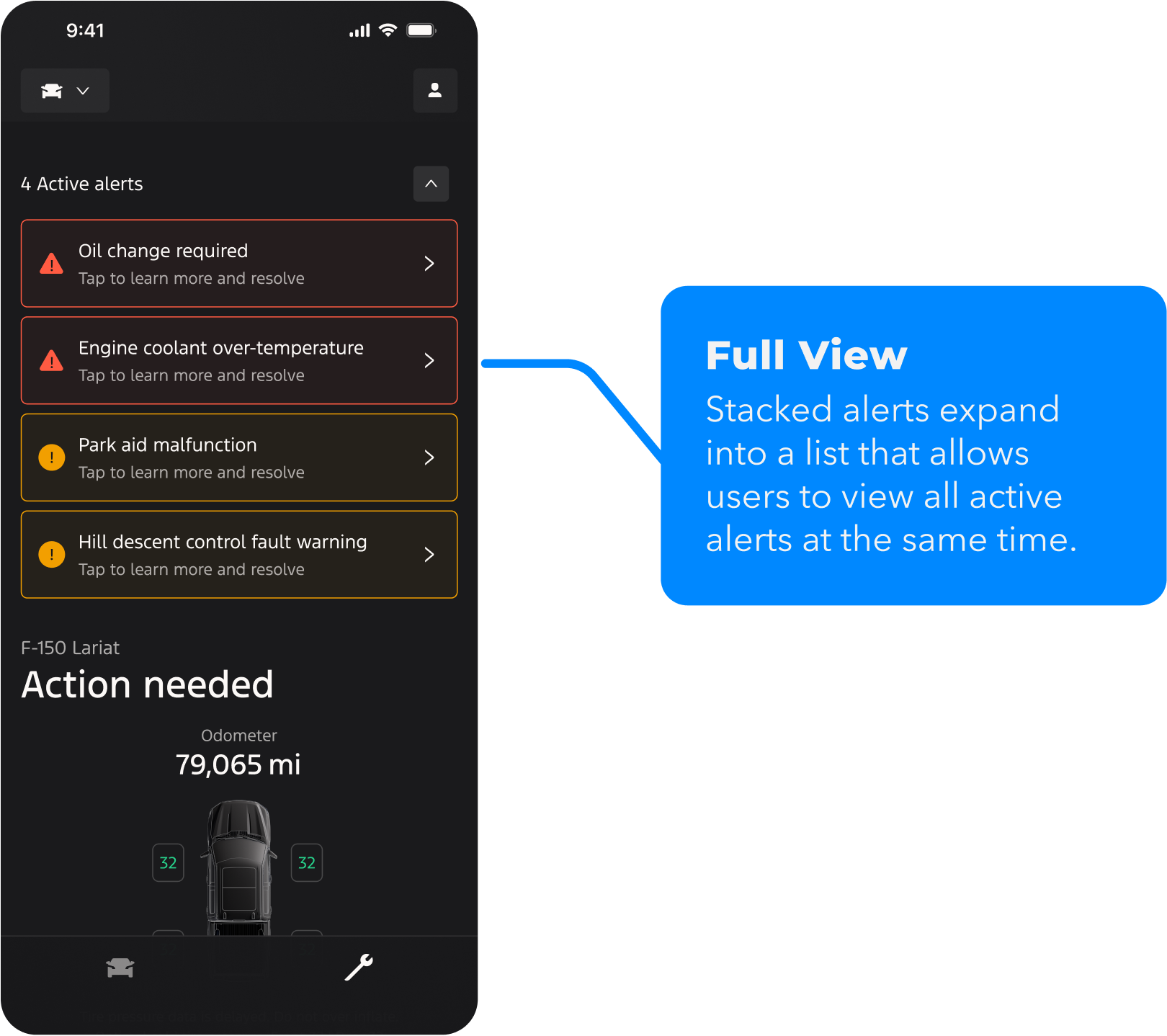
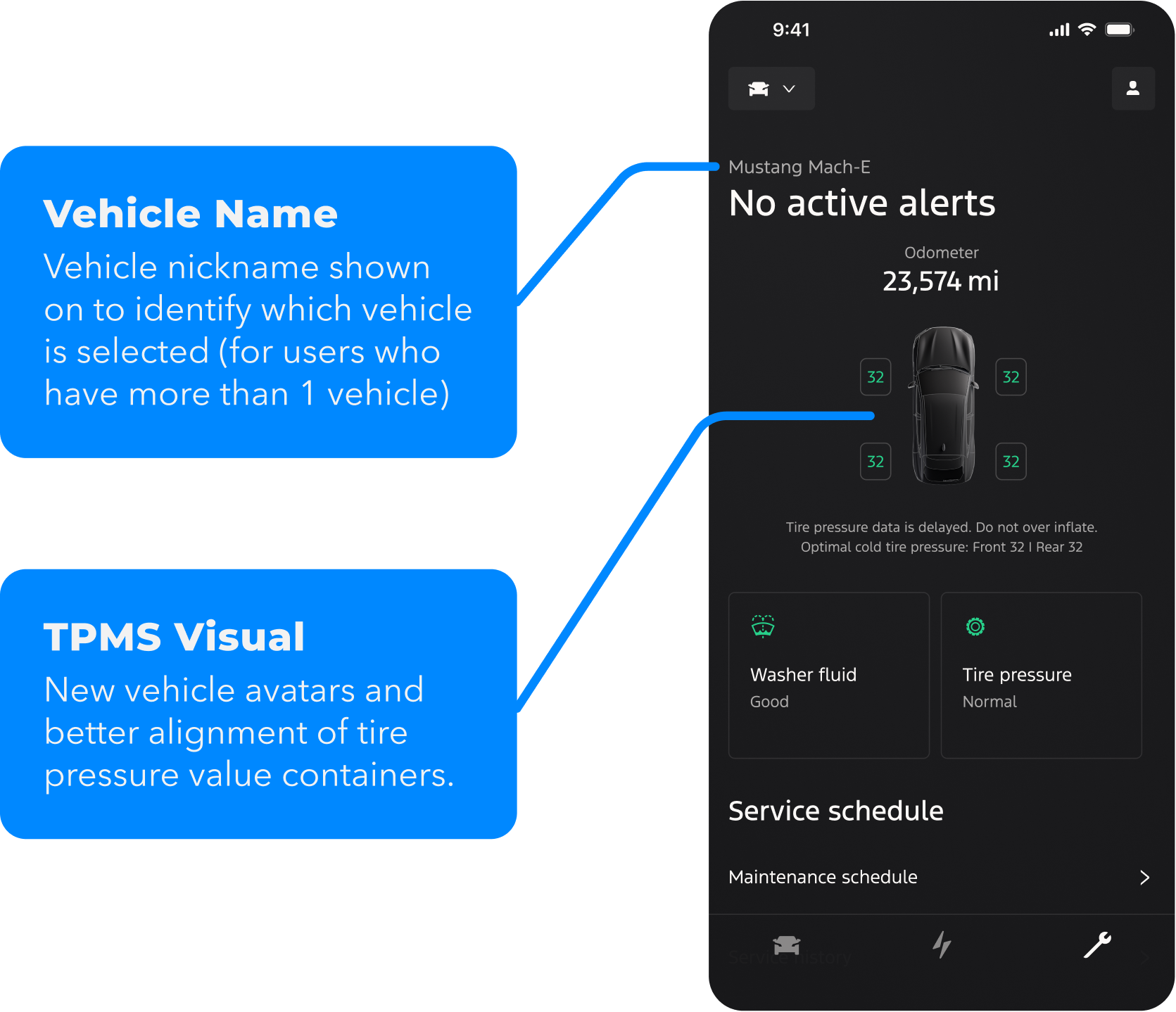
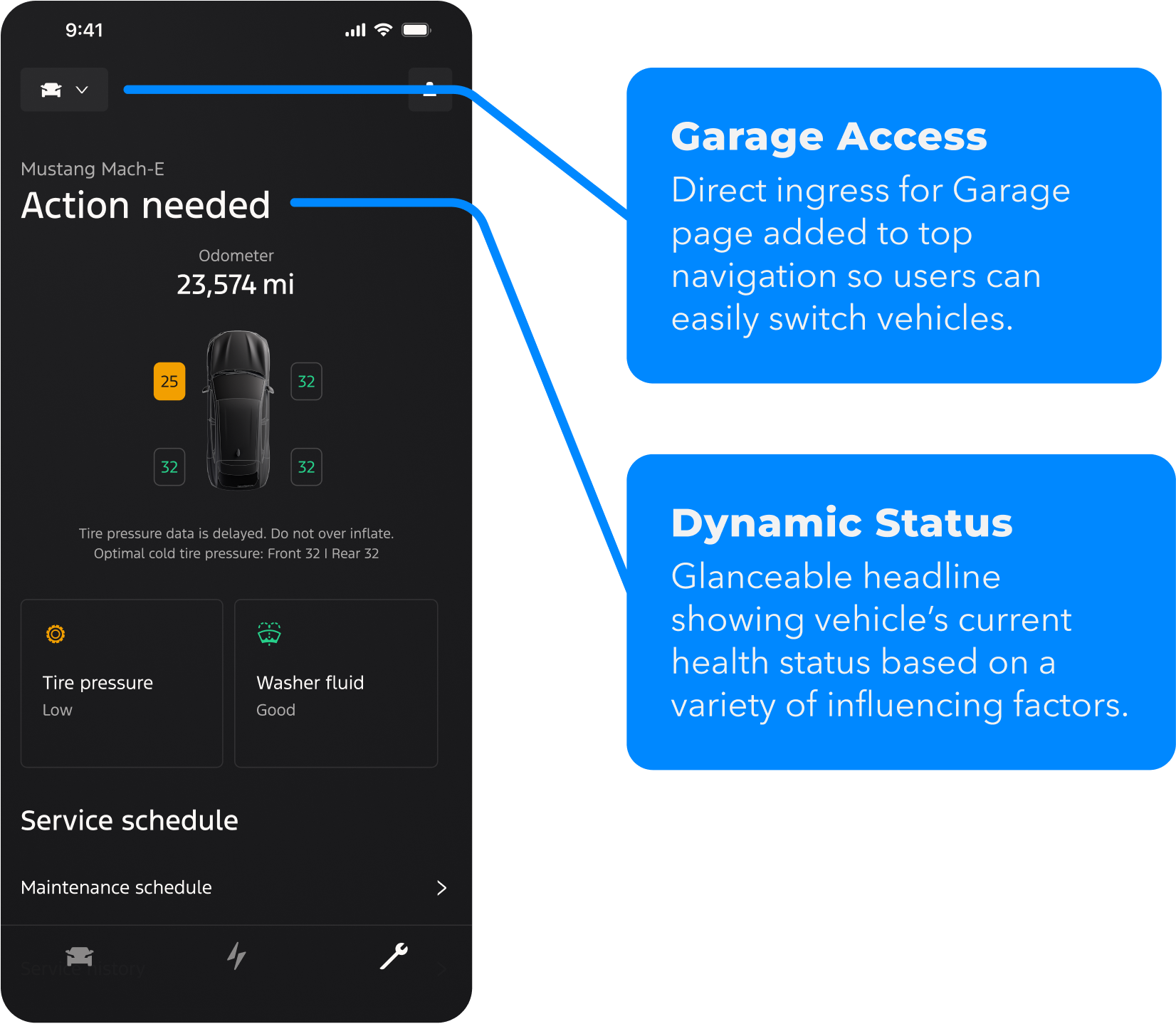
Vehicle name, dynamic vehicle health status, and improved alerts.
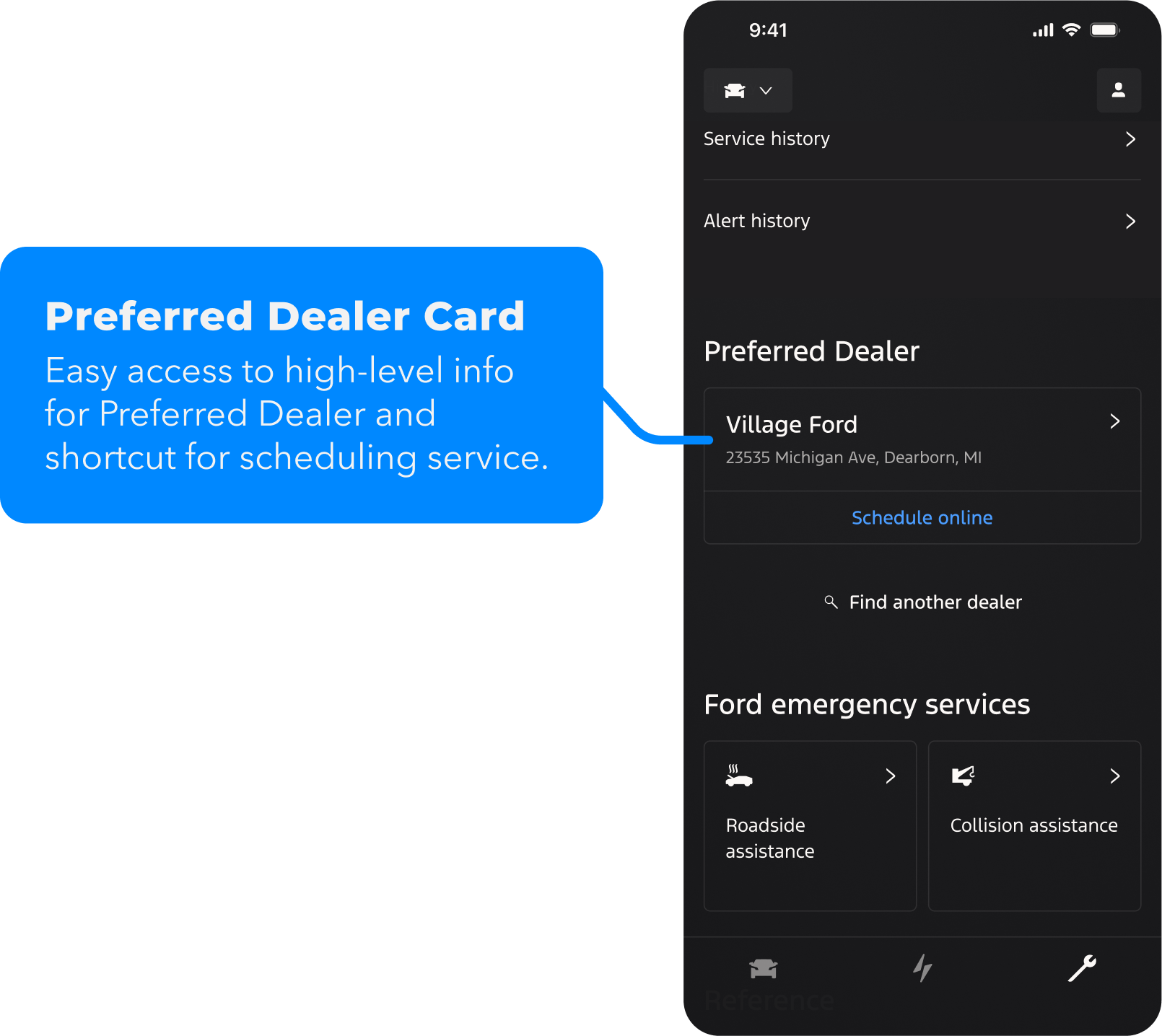
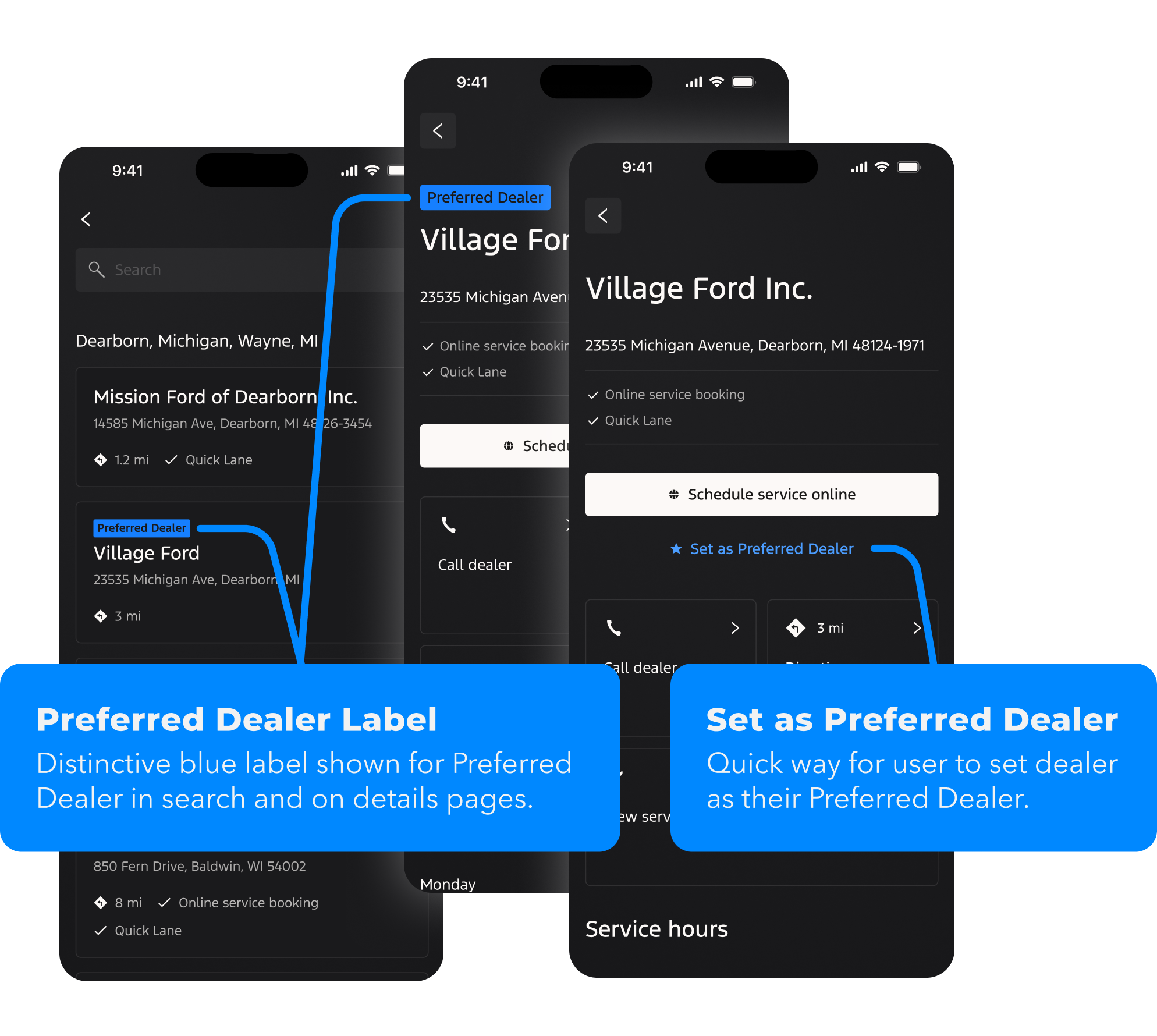

Service Planner
Release 3.0
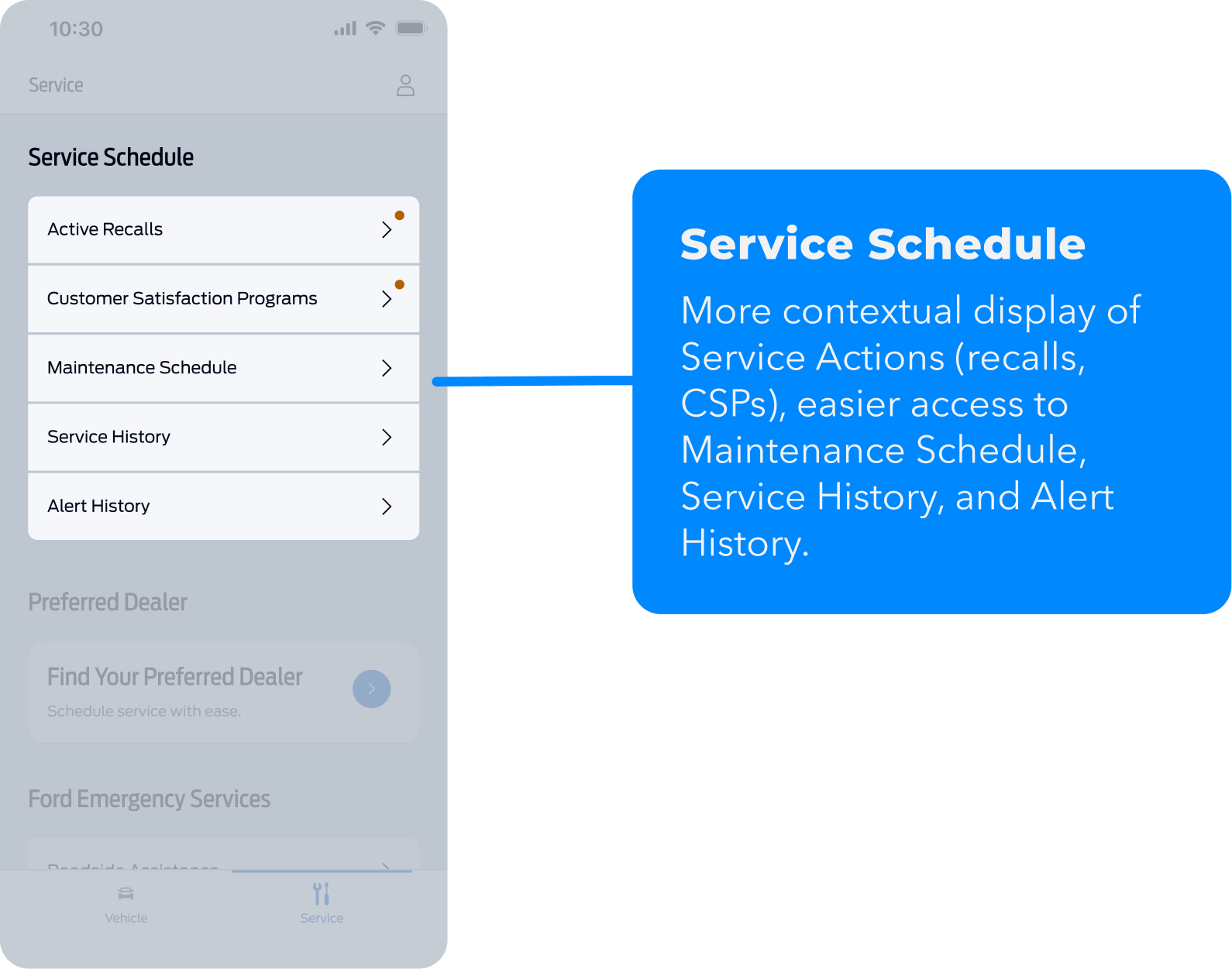
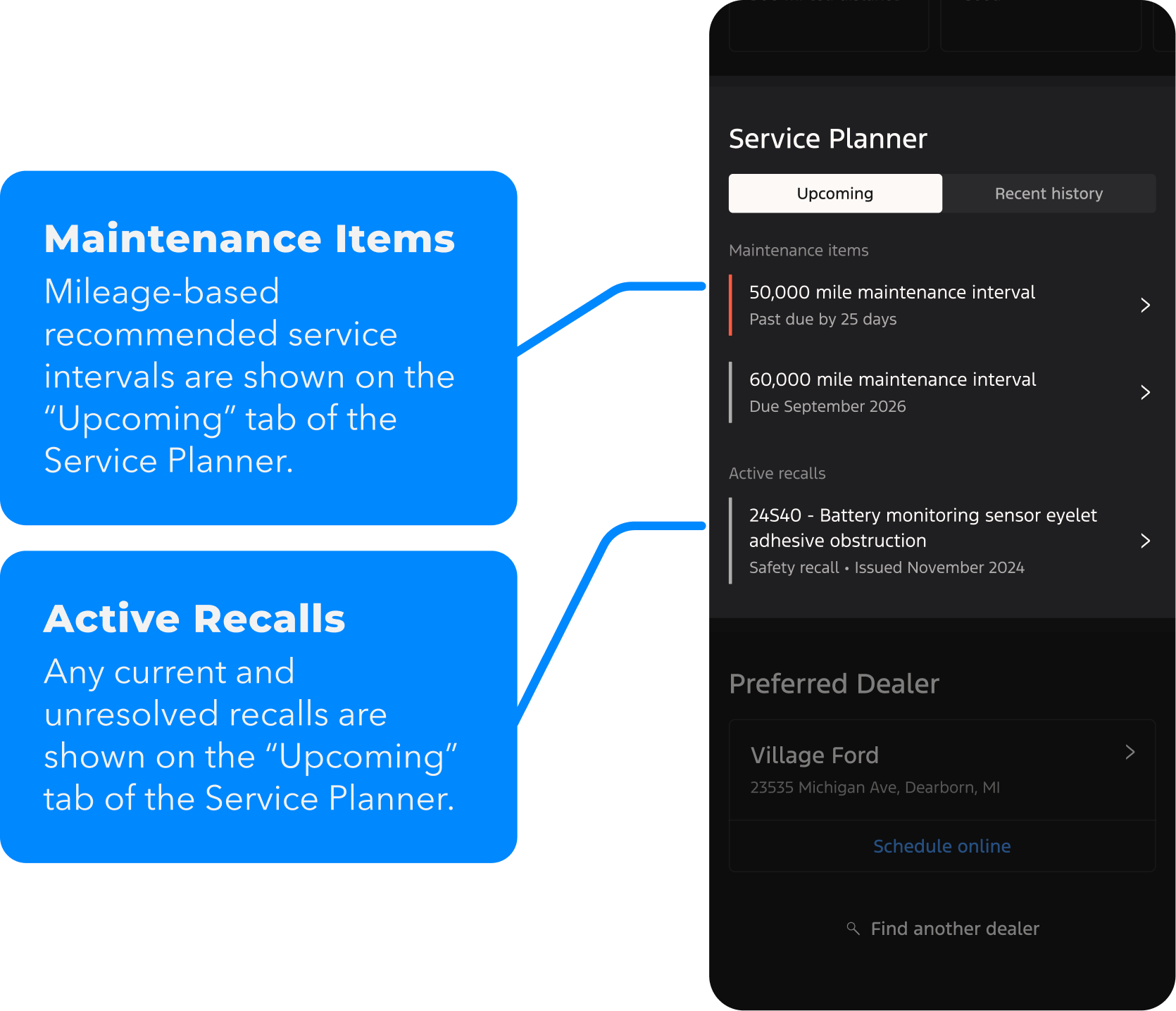
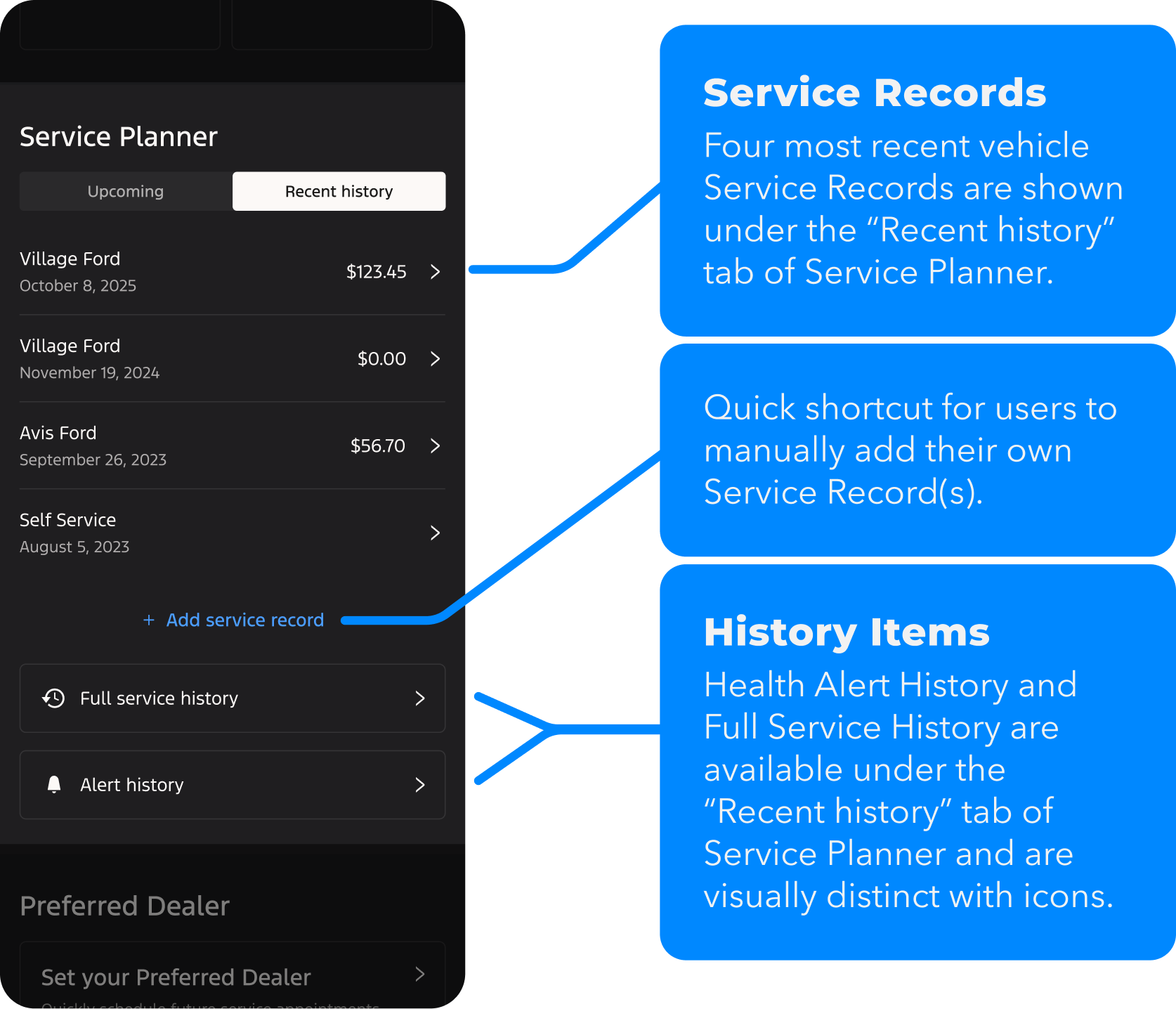
Streamlined view of upcoming vehicle maintenance items, active recalls, and service history.

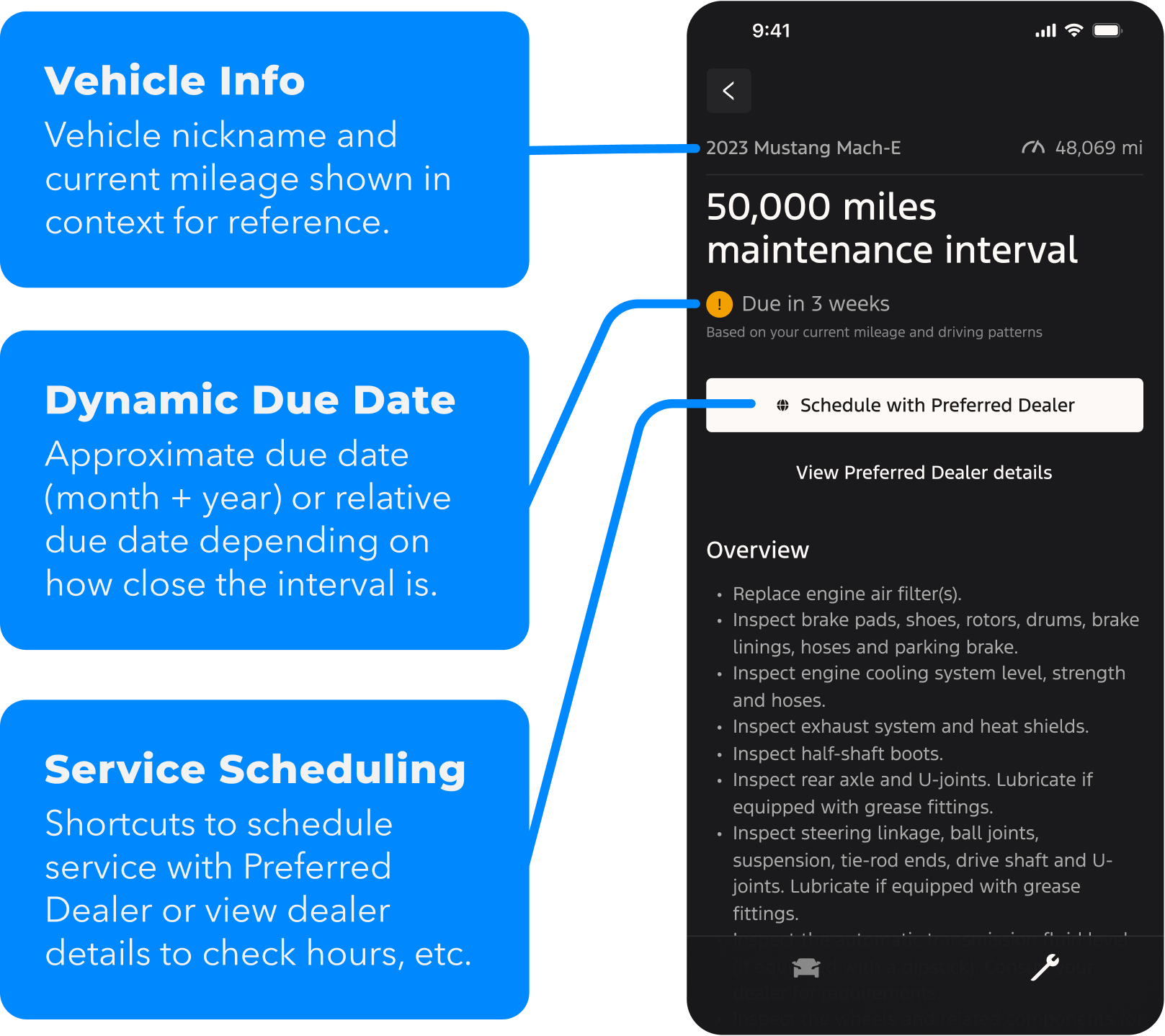
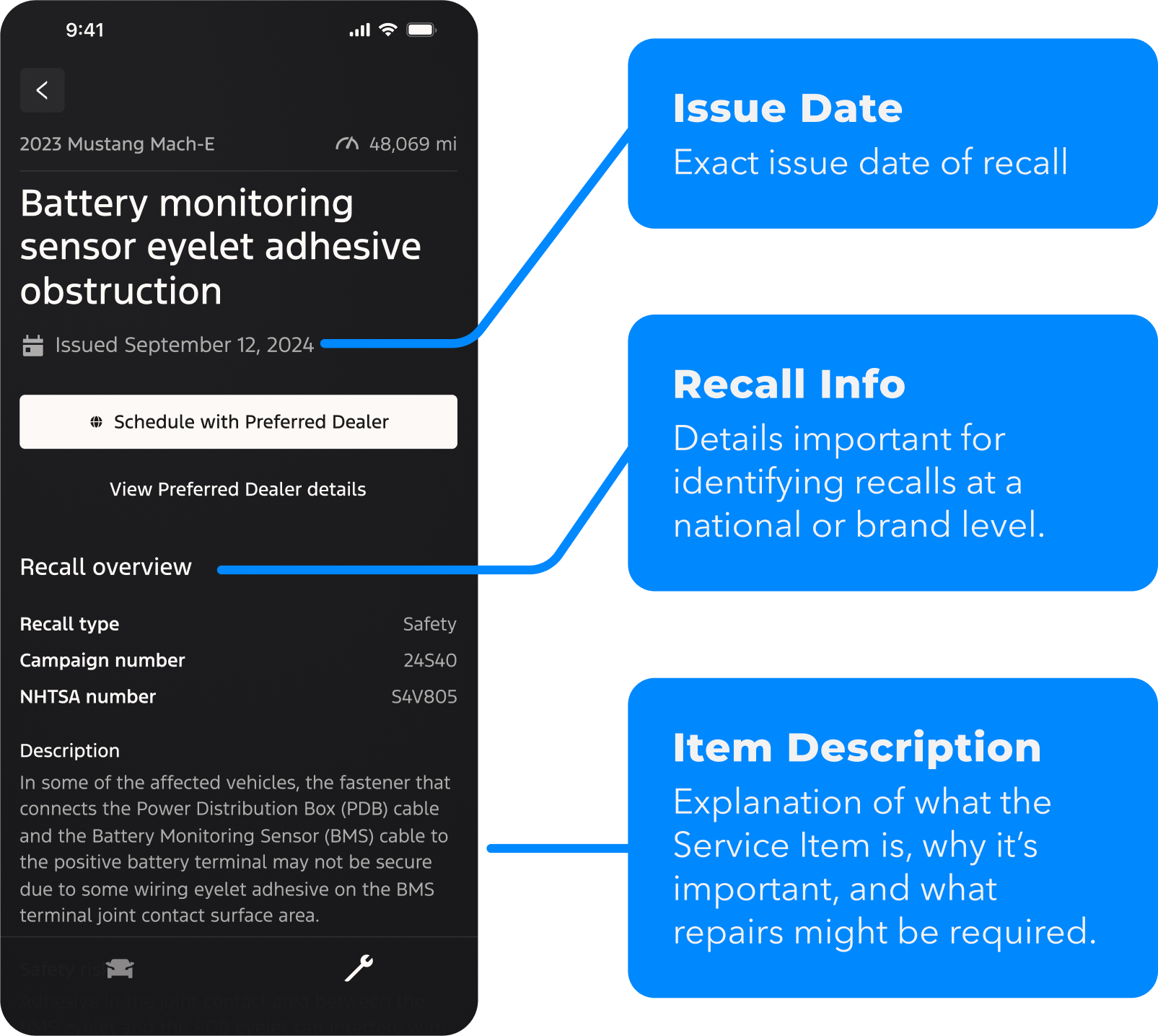
Service Item Details
Release 3.0
Clear and concise information about service items— what it is, why it matters, when it’s due, and next steps.
Release 2.0 & 3.0 – Results
Engagement
+
Task Success (conversion)
5.0
%
of users who viewed an active recall for their vehicle
scheduled a service appointment
30 day period BEFORE release 3.0
23.6
%
of users who viewed an active recall for their vehicle
+472%
scheduled a service appointment
30 day period AFTER release 3.0

Ford • Mobile App
Moving vehicle owners to put trust in their mobile app and book service at in-network providers
mobile design
design systems
design research
user testing
data-driven design
Project Objective
Redesign and create a set of vehicle health and care related features in the Ford and Lincoln mobile apps.
role
Lead Product Designer
timeline
15 months
core team
7 Engineers
3 Product Managers
2 Product Designers
Key Skills
UX/UI design
Prototyping
Data-driven design
tools & methods
Figma
UserZoom
User interviews
Usability testing

+30%
engagement
+30%
engagement
+30%
engagement
Central Question
How might we improve the user experience for managing vehicle health, care, and service from the mobile app?
Original Design

MVP Redesign
Final Redesign
The Problem
The existing set of vehicle health and service-related features were not engaging, useful, or helpful to users.
- No clear intent for “Service” tab
- Disparate features instead of a single ecosystem
- Important info shown in generic ways
- Key features hidden 4 clicks deep
- Users complain about missing or hard-to-find features
Pain Point #1
Knowledge
“I don’t feel like vehicle service is transparent and trustworthy.”
Pain Point #2
Impact
“I can’t track the impact of my actions on my vehicle’s health.”
Pain Point #3
Trust
“I don’t know how I should be taking care of my vehicle.”

of monthly users
didn’t visit the “Service” tab
70
%
2.4

Avg app rating*
88
%
of reviews* with negative sentiment
*For app reviews that contained service-related keywords
User reviews mentioned missing or hard-to-find features, and an outdated aesthetic.
By identifying specific targets and success metrics ahead of our design work, we were able to create a framework for measurable impact.

Engagement
Do they use it?

Task Success
Can they get stuff done?

Satisfaction
Do they love it?
Desired Outcomes

Increase engagement with the Service tab and its features

Increase number of users who set a Preferred Dealer

Encourage users to perform recommended routine maintenance checkups and service for their vehicle

Boost user’s confidence in knowing the health status of their vehicle just from the mobile app

Build greater trust between Ford Inc., Ford dealers, and Ford customers
Using a sequential series of UI updates and new feature releases, we were able to see the direct impact of our design decisions.
Vehicle Health Redesign 1.0
Release 1.0
A glanceable summary of the health and status of the vehicle.
Release 1.0 – Results
Engagement
+30pp
60.6
%
of active users
engaged with the “Service” tab
70
%
of active users
made multiple visits to the “Service” tab

Task Success (conversion)
45.9
%
of users who tapped alert
completed repair at an in-network dealer
130
k
“Oil change” alerts tapped
28.1
%
of users who tapped alert
scheduled service within 30 days
+200
%
service appts booked after viewing recall
Satisfaction
+0.5
2.9
Average app review rating (out of 5)
2025 EOY target = 2.9
+130%
28
%
of app store reviews
contained positive sentiment
2025 EOY target = 30%
With validation that our initial design interventions were having the desired effect, we solidified stakeholder buy-in for the redesign initiative and next phases.

Vehicle Health Redesign – 2.0
Release 2.0
Vehicle name, dynamic vehicle health status, and improved alerts.

Service Planner
Release 3.0
Streamlined view of upcoming vehicle maintenance items, active recalls, and service history.
Service Item Details
Release 3.0
Clear and concise information about service items— what it is, why it matters, when it’s due, and next steps.
Release 2.0 & 3.0 – Results
Engagement
+
Task Success (conversion)
5.0
%
of users who viewed an active recall for their vehicle
scheduled a service appointment
30 day period BEFORE release 3.0

23.6
%
of users who viewed an active recall for their vehicle
+472%
scheduled a service appointment
30 day period AFTER release 3.0

Ford • Mobile App
Moving vehicle owners to put trust in their mobile app and book service at in-network providers
mobile design
design systems
design research
user testing
data-driven design
Project Objective
Redesign and create a set of vehicle health and care related features in the Ford and Lincoln mobile apps.
role
Lead Product Designer
timeline
15 months
core team
7 Engineers
3 Product Managers
2 Product Designers
Key Skills
UX/UI design
Prototyping
Data-driven design
tools & methods
Figma
UserZoom
User interviews
Usability testing

+30%
engagement
+30%
engagement
+30%
engagement
Central Question
How might we improve the user experience for managing vehicle health, care, and service from the mobile app?
Original Design

MVP Redesign
Final Redesign
The Problem
The existing set of vehicle health and service-related features were not engaging, useful, or helpful to users.
- No clear intent for “Service” tab
- Disparate features instead of a single ecosystem
- Important info shown in generic ways
- Key features hidden 4 clicks deep
- Users complain about missing or hard-to-find features
Pain Point #1
Knowledge
“I don’t feel like vehicle service is transparent and trustworthy.”
Pain Point #2
Impact
“I can’t track the impact of my actions on my vehicle’s health.”
Pain Point #3
Trust
“I don’t know how I should be taking care of my vehicle.”

of monthly users
didn’t visit the “Service” tab
70
%
2.4

Avg app rating*
88
%
of reviews* with negative sentiment
*For app reviews that contained service-related keywords
User reviews mentioned missing or hard-to-find features, and an outdated aesthetic.
By identifying specific targets and success metrics ahead of our design work, we were able to create a framework for measurable impact.

Engagement
Do they use it?

Task Success
Can they get stuff done?

Satisfaction
Do they love it?
Desired Outcomes
Increase engagement with the Service tab and its features
Increase number of users who set a Preferred Dealer
Encourage users to perform recommended routine maintenance checkups and service for their vehicle
Boost user’s confidence in knowing the health status of their vehicle just from the mobile app
Build greater trust between Ford, dealers, and customers
Using a sequential series of UI updates and new feature releases, we were able to see the direct impact of our design decisions.
Vehicle Health Redesign 1.0
Release 1.0
A glanceable summary of the health and status of the vehicle.
Release 1.0 – Results
Engagement
+30pp
60.6
%
of active users
engaged with the “Service” tab
70
%
of active users
made multiple visits to the “Service” tab

Task Success (conversion)
45.9
%
of users who tapped alert
completed repair at an in-network dealer
130
k
“Oil change” alerts tapped
28.1
%
of users who tapped alert
scheduled service within 30 days
+200
%
service appts booked after viewing recall
Satisfaction
+0.5
2.9
Average app review rating (out of 5)
2025 EOY target = 2.9
+130%
28
%
of app store reviews
contained positive sentiment
2025 EOY target = 30%
With validation that our initial design interventions were having the desired effect, we solidified stakeholder buy-in for the redesign initiative and next phases.
Vehicle Health Redesign – 2.0
Release 2.0
Vehicle name, dynamic vehicle health status, and improved alerts.

Service Planner
Release 3.0
Streamlined view of upcoming vehicle maintenance items, active recalls, and service history.
Service Item Details
Release 3.0
Clear and concise information about each service item— what it is, why it matters, when it’s due, and next steps.
Release 2.0 & 3.0 – Results
Engagement
+
Task Success (conversion)
5.0
%
of users who viewed an active recall for their vehicle
scheduled a service appointment
30 day period BEFORE release 3.0

23.6
%
of users who viewed an active recall for their vehicle
+472%
scheduled a service appointment
30 day period AFTER release 3.0